IGNOU Admission Status 2026: Students who have applied for admission to Indira Gandhi National Open University (IGNOU) can check their admission status online to find out whether their application and registration details are available in the university’s system. Checking the status is an important step after submitting the admission form, uploading documents and paying the applicable programme fee.
The IGNOU admission status portal helps applicants access their admission and registration details using their enrolment number and programme code. If you have applied for a new programme, you can use the available status service to check your records. Existing students should understand that fresh admission and re-registration are different processes and may use different portals.
This article explains how to check IGNOU admission status in 2026, how to understand the information displayed, what to do if the status is unavailable, and which official links students should use.
IGNOU Admission Status 2026: Overview
| Particulars | Details |
|---|---|
| University | Indira Gandhi National Open University |
| Popular search term | IGNOU Admission Status 2026 |
| Purpose | Check admission and registration details |
| Status-check mode | Online |
| Information required | Enrolment number and programme code |
| Verification | Enter the verification code displayed on the portal |
| Official admission-status link | https://isms.ignou.ac.in/changeadmdata/AdmissionStatusNew.ASP |
| Fresh admission portal | https://ignouadmission.samarth.edu.in/ |
| Online programme admission | https://ignouiop.samarth.edu.in/ |
| Re-registration portal | https://onlinerr.ignou.ac.in/ |
| Official university website | https://www.ignou.ac.in/ |
| Important advice | Verify your details and follow the latest official instructions |
The status service is intended to help applicants access available admission and registration information. The information displayed may depend on the processing stage of the application and the records available in the university system.
What Is IGNOU Admission Status?
IGNOU admission status is the information available about an applicant’s admission or registration with the university. After submitting an application, students naturally want to know whether their details have been processed and whether their admission information is available.
IGNOU offers undergraduate, postgraduate, diploma, postgraduate diploma and certificate programmes through different learning modes. Applicants submit their forms through the relevant admission portal and provide the documents required for their chosen programme.
After an application is submitted, applicants can use the relevant status service to check their admission and registration information. The status page may help them identify their enrolment details and review the records available in the university’s system.
However, submitting an application does not necessarily mean that every admission-related process has been completed. Applicants should check the status information carefully and follow any additional instructions communicated by IGNOU.
Official IGNOU Admission Status Link 2026
Students can use the following official link to check their admission and registration details.
IGNOU Admission Status Check: Click Here to Check Admission Status
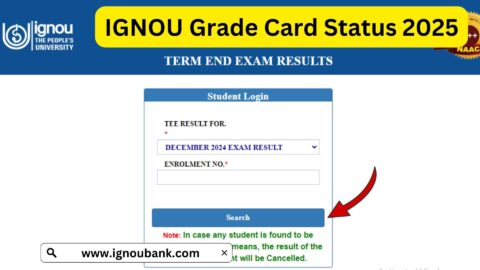
The page is titled “Know Your Admission/Registration Details.” It asks applicants to enter their enrolment number, select their programme code and complete the displayed verification process.
Keep your admission information ready before opening the portal. If you have recently submitted your application and your details are not yet available, check the admission portal again later and review any messages or notices issued by the university.
How to Check IGNOU Admission Status Online?
Follow these steps to check your admission status through the official portal.
Step 1: Open the Official Status Portal
Visit the IGNOU admission and registration status page:
https://isms.ignou.ac.in/changeadmdata/AdmissionStatusNew.ASP
Make sure you are using the official IGNOU domain before entering your information.
Step 2: Enter Your Enrolment Number
Enter the enrolment number requested by the portal. Check each digit carefully to avoid errors.
If you have not received an enrolment number yet, review your admission dashboard, confirmation messages and application records. You may need to use the admission portal to track the application rather than the enrolment-number-based status page.
Step 3: Select Your Programme Code
Choose the programme code corresponding to the course for which you applied. The programme code identifies your selected programme and helps the system retrieve the appropriate information.
Do not select a programme code simply because it resembles another course’s code. Verify it against your application confirmation or programme details.
Step 4: Enter the Verification Code
The page may display a verification image or code. Enter the characters as shown on the screen.
If the code is difficult to read, use the available refresh option, if provided, and try again.
Step 5: Submit Your Details
Submit the requested information using the option provided on the page.
Step 6: Review the Available Information
Check the admission or registration information displayed. Verify your enrolment details and programme information, and read any instructions shown on the page.
If the status does not appear, do not immediately assume that your application has been rejected. Confirm that the information entered is correct and check the application dashboard or contact the appropriate Regional Centre if necessary.
How to Understand Your IGNOU Admission Status?
Applicants may be concerned if they see a status that appears incomplete or if their admission information is not available. The exact wording and available information can vary according to the system and processing stage.
The following table explains how to approach common situations. These are general explanations, not a guarantee that every label appears on the IGNOU portal.
| Situation | What It May Mean | What You Should Do |
|---|---|---|
| Admission details are displayed | The system has retrieved admission or registration information | Check your programme and enrolment details for accuracy |
| Application is under process | The application may still be undergoing processing or verification | Review the admission dashboard and wait for further updates |
| Enrolment number is not available | The number may not yet have been generated or may not be accessible through the selected service | Check your application confirmation and admission portal |
| No record is found | The details may be incorrect or the record may not yet be available in that system | Recheck your enrolment number and programme code |
| Verification code is incorrect | The code may have been entered incorrectly or may have expired | Refresh the code if possible and submit again |
| Admission information appears incorrect | There may be an error in the retrieved record or application details | Contact the appropriate IGNOU authority with supporting information |
| Fee payment is not reflected | Payment confirmation or application processing may be incomplete | Check your payment receipt and official application dashboard |
A missing record or delayed update should not automatically be interpreted as rejection. Check the official application dashboard and follow the instructions provided by IGNOU before taking further action.
IGNOU Admission Status for the January and July Sessions
IGNOU generally operates admission cycles associated with January and July sessions, although the availability of individual programmes and their application schedules may differ.
January Admission Session
Applicants who apply during the January cycle should check the admission status using the portal and application details relevant to their programme. They should also monitor official notices for document verification, confirmation and other admission-related updates.
July Admission Session
Students applying for the July cycle should follow the same general approach. However, deadlines, available programmes and admission requirements can change from one cycle to another.
Applicants should not rely on an old deadline or assume that all programmes follow the same admission schedule. Always check the latest official announcement and the relevant admission portal.
Difference Between IGNOU Admission Status and Re-Registration Status
One common source of confusion is the difference between fresh admission and re-registration.
Fresh admission is generally for applicants joining a programme for the first time or applying for admission to a new programme. Re-registration is used by eligible existing students who need to register for the next semester or academic year in accordance with their programme structure.
| Feature | Fresh Admission | Re-Registration |
|---|---|---|
| Intended users | New applicants and eligible applicants entering a programme | Existing students continuing their programme |
| Main purpose | Apply for admission | Register for the next semester or academic year |
| Portal | https://ignouadmission.samarth.edu.in/ | https://onlinerr.ignou.ac.in/ |
| Information needed | Details requested in the admission form | Existing student credentials and programme information |
| Main follow-up | Check application and admission information | Check the re-registration application and payment details |
If you have already enrolled and want to continue into the next academic year, do not confuse re-registration with fresh admission. Use the portal relevant to your situation and programme.
Online programmes may also have a separate admission portal, so students should check the programme’s official instructions before applying.
What to Do If IGNOU Admission Status Is Not Showing?
Sometimes students cannot find their admission information even after submitting the form. There can be several reasons, and the appropriate response depends on the situation.
1. Check Your Enrolment Number
If you have received an enrolment number, verify it against your official records. A typing mistake may prevent the system from retrieving the correct information.
2. Verify Your Programme Code
Make sure you have selected the same programme code used in your application. Selecting the wrong code may lead to an unsuccessful status search.
3. Check Your Admission Dashboard
Log in to the admission portal through which you submitted your application. Review the available application information, payment details and any messages or instructions.
4. Review Your Payment Confirmation
If you paid the programme fee online, retain your payment receipt or transaction reference. Check the official portal to determine whether the payment has been recorded.
Avoid making a second payment without first checking the status of the original transaction and following the university’s instructions.
5. Allow Time for Processing
If you submitted your form recently, your details may not immediately appear in every status service. Check the portal again after some time and monitor your registered email address and mobile number for official updates.
6. Contact the Appropriate Regional Centre
If the problem continues, contact the Regional Centre responsible for your admission or programme. Explain the issue clearly and provide the information requested by the university.
Use the official Regional Centre contact details published on the IGNOU website. Do not send personal documents to unverified email addresses or third-party websites.
Important Links for IGNOU Admission Status 2026
The following table lists useful official resources for checking admission information, applying for programmes and accessing student services.
| Purpose | Important Link |
|---|---|
| Check IGNOU admission and registration status | Open Admission Status Portal |
| IGNOU official website | Visit IGNOU |
| Fresh admission for ODL programmes | Open ODL Admission Portal |
| Online programme admission | Open Online Admission Portal |
| Re-registration | Open Re-Registration Portal |
| IGNOU student services | Visit Student Services |
| Know Your Status page | Open Registration and Status Services |
| Student grievance portal | Visit IGNOU iGRAM |
| IGNOU Common Prospectus | Read Programme and Admission Guidelines |
Use the status portal for admission and registration information, the relevant Samarth portal for application-related tasks, and the official grievance service if you need to raise an unresolved issue.
Common Mistakes to Avoid While Checking Admission Status
Students can save time by avoiding the following mistakes.
Entering an incorrect enrolment number: Recheck every digit before submitting the form.
Selecting the wrong programme code: Use the code corresponding to your actual application.
Using an outdated admission link: Check the official IGNOU website if a previously saved link no longer works.
Confusing fresh admission with re-registration: Choose the correct portal according to whether you are applying for a new programme or continuing an existing one.
Assuming a delay means rejection: A record that is not yet displayed does not, by itself, prove that an application has been rejected.
Ignoring official messages: Check your registered email address, mobile number and admission dashboard for instructions.
Paying again without checking: If a payment is not reflected, verify the transaction before attempting another payment.
Sharing personal details on unofficial websites: Use official IGNOU services and verified contact channels to protect your information.
Tips for Applicants After Checking IGNOU Admission Status
Once you have accessed your admission information, take a few additional steps to keep your academic records organised.
- Save your admission confirmation and fee receipt.
- Keep a copy of your enrolment number and programme code in a secure place.
- Check the programme details displayed in your records.
- Monitor your registered email address and mobile number for university communications.
- Visit your Regional Centre’s official website for induction meetings and academic counselling schedules.
- Download the applicable programme guide and review assignment requirements.
- Keep track of assignment submission and examination form deadlines separately.
- Contact the appropriate university authority if you find a discrepancy in your details.
Admission confirmation is an important milestone, but students should also keep track of the academic requirements that follow.
FAQ about IGNOU Admission Status 2026
What is the official IGNOU admission status link?
The official admission and registration status page is:
https://isms.ignou.ac.in/changeadmdata/AdmissionStatusNew.ASP
What details are required to check IGNOU admission status?
The status page asks for your enrolment number, programme code and the verification code displayed on the portal.
Can I check IGNOU admission status using my name?
The official status page is designed to retrieve details using the enrolment number and programme code. If you do not have an enrolment number yet, check your admission application dashboard and confirmation messages.
Why is my IGNOU admission status not showing?
Possible reasons include an incorrect enrolment number, an incorrect programme code, a verification issue or a record that is not yet available in the status service. Check your details and review your application dashboard.
How long does IGNOU take to confirm admission?
The processing time can vary depending on the application, programme and verification requirements. Check the admission portal and official communications for updates rather than relying on a fixed timeframe.
Is admission status the same as registration status?
The terms are closely related in the university’s status services, but the exact information available can vary. Use the official status portal to review the admission and registration details associated with your record.
Can I check admission status without an enrolment number?
The admission-status page requests an enrolment number and programme code. If you have not received an enrolment number, use the admission portal through which you submitted your application to track available information.
What should I do if my admission details are incorrect?
Check the information against your application records and contact the appropriate Regional Centre or university authority through official channels. Keep your application confirmation and relevant supporting documents available.
What is the difference between fresh admission and re-registration?
Fresh admission is generally for applicants joining a programme, while re-registration is for eligible existing students continuing into the next semester or academic year. The processes use different portals.
Can I check IGNOU admission status on my mobile phone?
You can access the official status portal through a compatible mobile browser. Enter the requested details carefully and use the verification code displayed on the page.
What should I do if the portal does not accept the verification code?
Check the characters carefully and refresh the code if the option is available. If the problem continues, try again later or use another compatible browser.
Where can I raise a complaint about an admission issue?
Start by contacting your relevant Regional Centre using the official contact details published by IGNOU. You can also visit the IGNOU iGRAM grievance portal for available grievance-related services.
Conclusion
Checking IGNOU admission status in 2026 helps applicants review the admission and registration information available in the university’s system. The process is straightforward: open the official status portal, enter your enrolment number, select your programme code, complete the verification step and review the information displayed.
If your status is unavailable, verify your details and check the admission dashboard before drawing conclusions. Applicants should also distinguish between fresh admission, online programme admission and re-registration so they use the correct portal.
For the quickest starting point, visit the official IGNOU admission status portal. Keep your application confirmation and payment receipt, monitor official communications and contact the appropriate Regional Centre if you need further assistance.